Sheet 01 Opening

I draw it. I build it.

Design and development of websites, Telegram bots and Mini Apps — by one person. The mockup never goes to “another developer”, so the product looks exactly like the sketch.

I do
Websites & landings
Telegram bots
Mini Apps
Interface motion
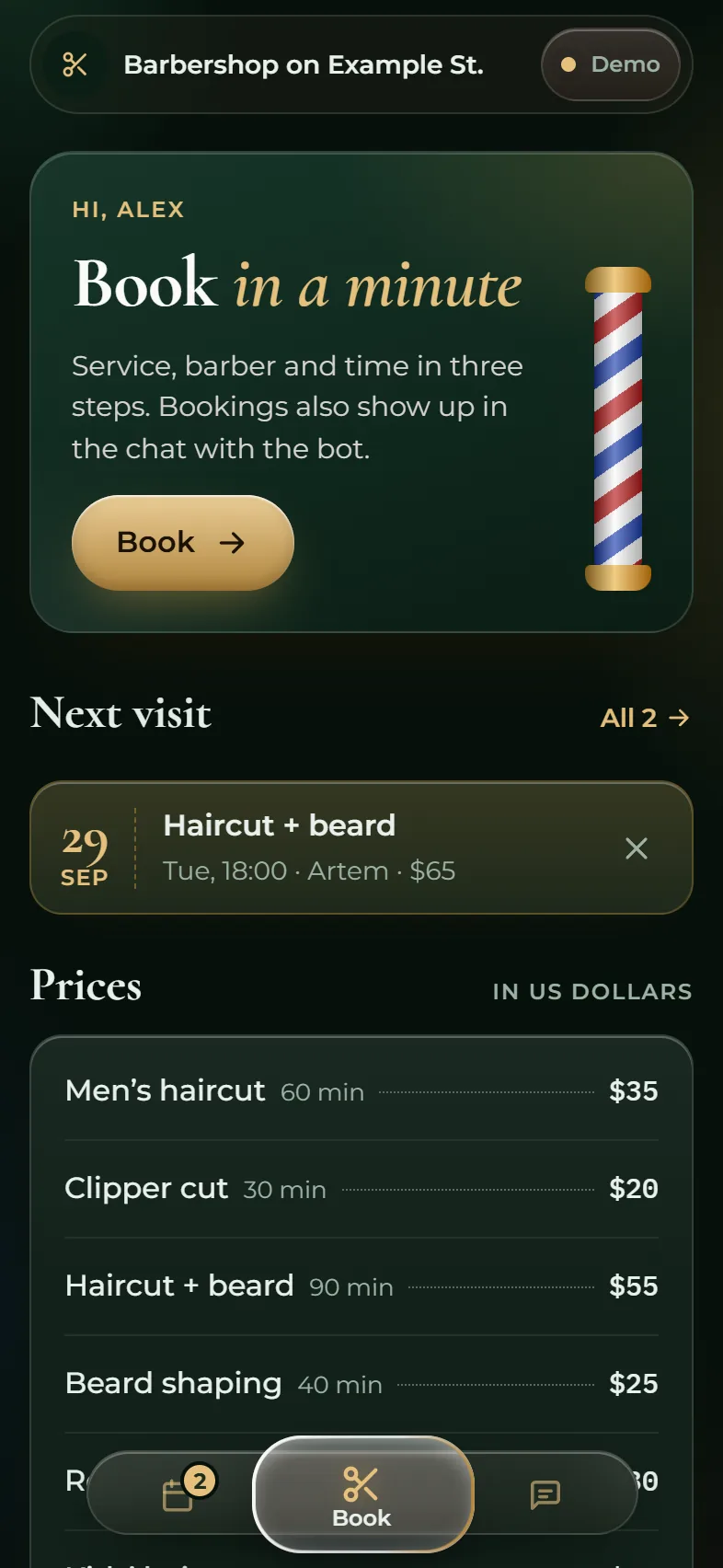
Finished home screen of the barbershop Mini App in the dark theme
360R2467
Fig. 1. Home screen of the “Barbershop on Example St.” Mini App. Sketch on the left, the built screen on the right — drag the divider. See the work ↓

Sheet 02 Work

Work

Five projects. All open from a link and work without Telegram or sign-up.

Sheet 02.1. Screen recording

02.1 Telegram Mini App and bot

Barbershop on Example St.

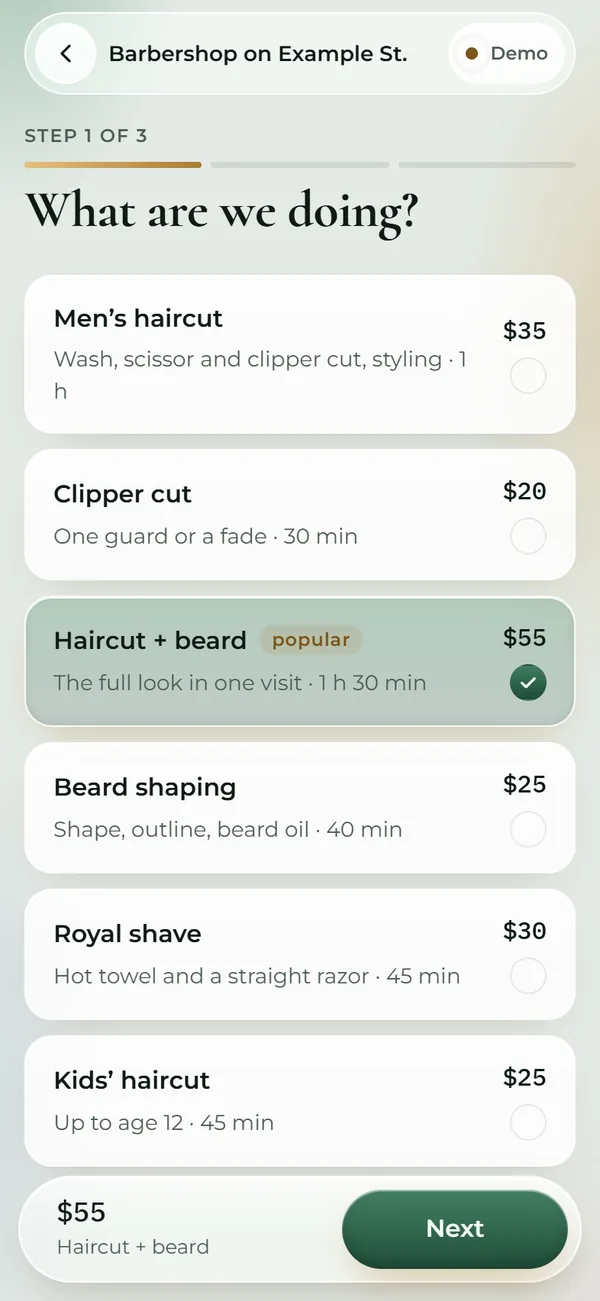
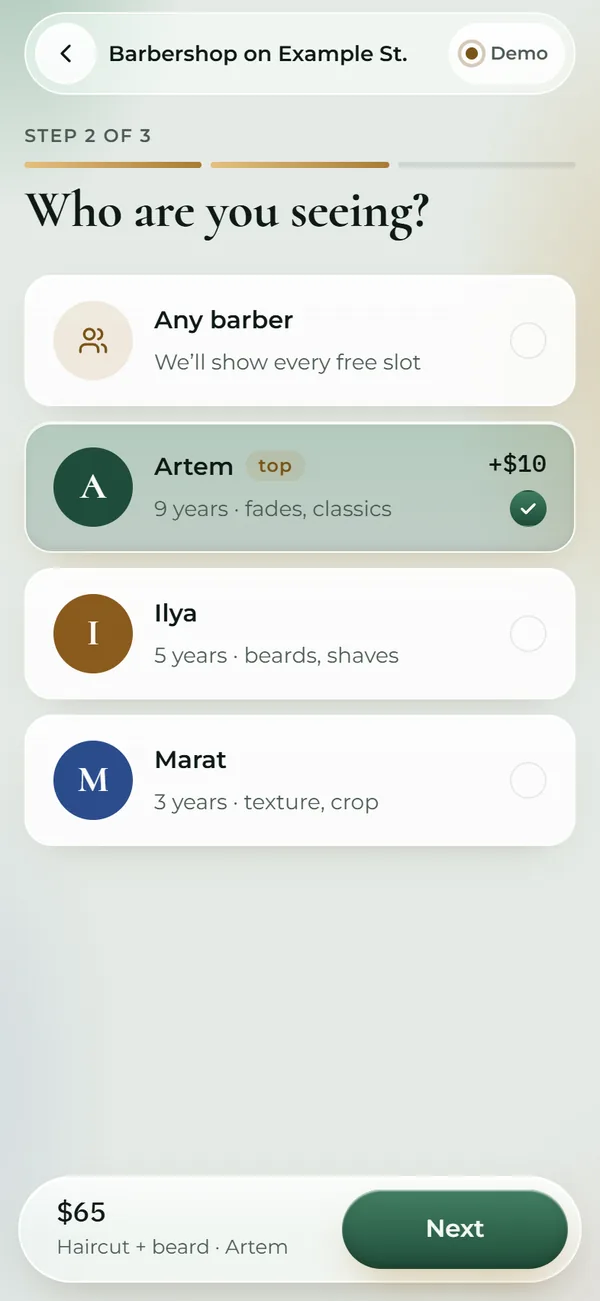
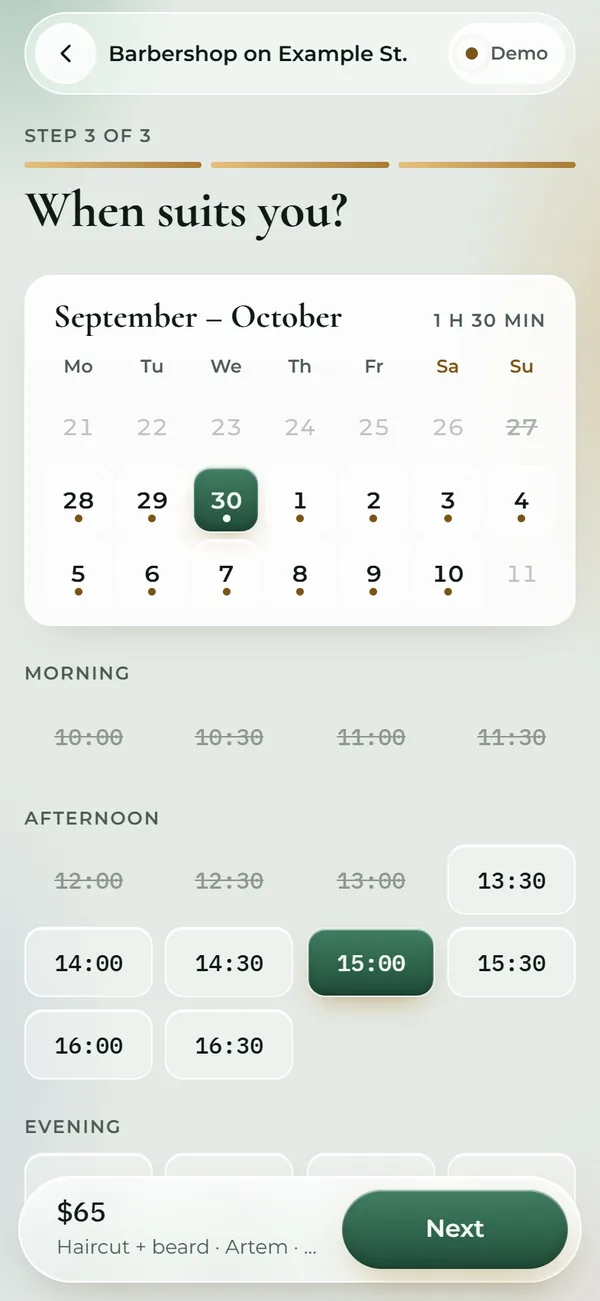
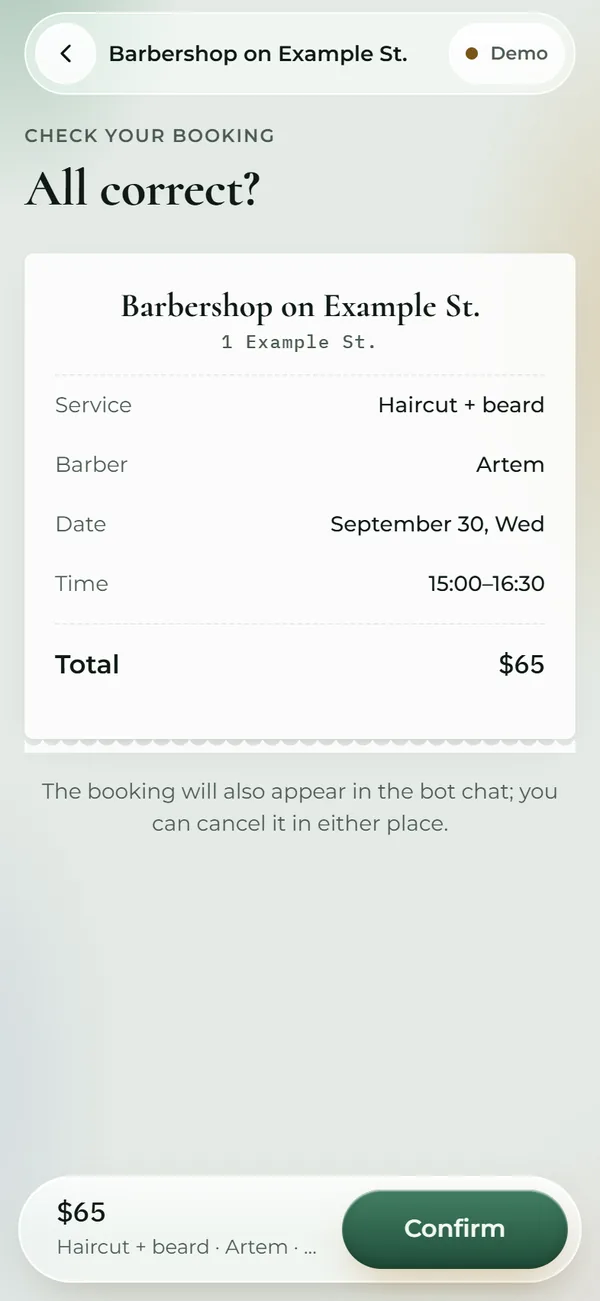
Book a barber in three steps right inside Telegram. The Mini App and the bot share one database: a booking made in the chat shows up in the app, and vice versa.

PlatformTelegram Mini App and bot
Screens8: home, my bookings, contacts, three booking steps, review, ticket
Themeslight and dark, follow Telegram; 4 palettes
Glass16 px blur on navigation only — keeps iPhones smooth
Transitions110–190 ms
LanguagesEnglish, Ukrainian, Slovak, Russian — with $, ₴, € prices
StackHTML, CSS, JS · Python, aiogram 3, aiohttp · SQLite
Open the demo (opens in a new tab) barbershop.anorrodev.tech

Booking flow

5 screens, 3 steps

  1. 1Service

  2. 2Barber

  3. 3Time

  4. 4Review

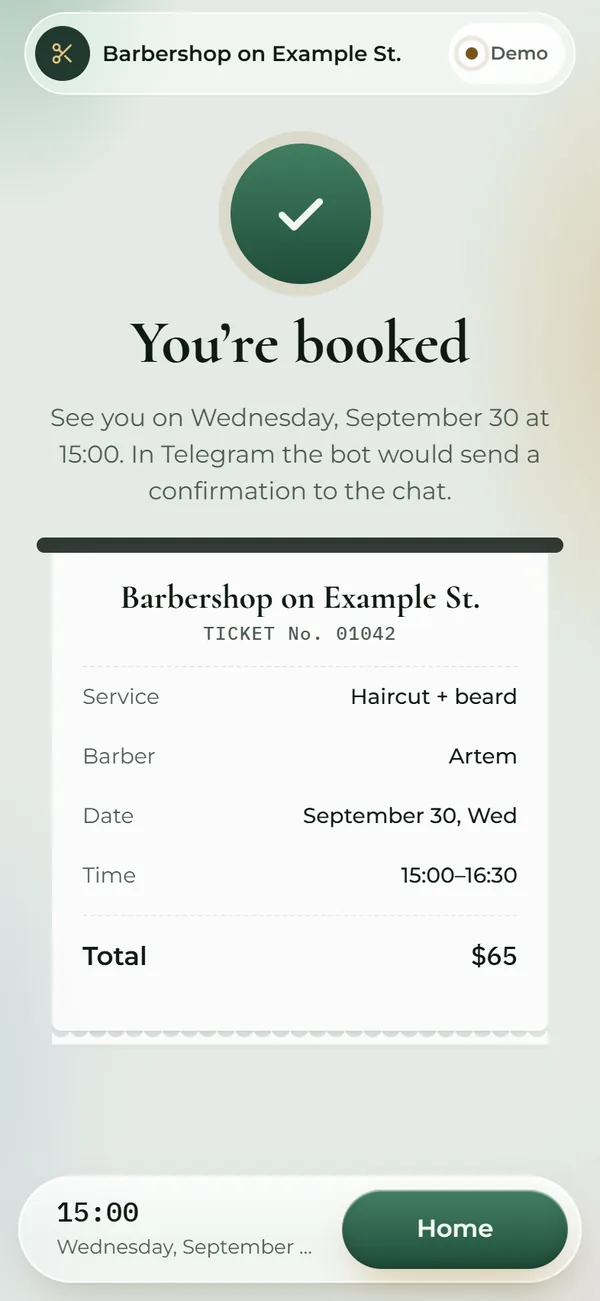
  5. 5Done

  1. “Step 1 of 3” progress is always visible.

  2. “Any barber” shows every free slot at once.

  3. The top-barber surcharge is shown before you pick, not on the receipt.

  4. A dot under a date means free slots; a struck-out date is fully booked.

  5. Times are split into morning, afternoon and evening.

  6. After booking, a ticket “prints” like a receipt.
02.2 Web concept of the same booking

“The Pole”

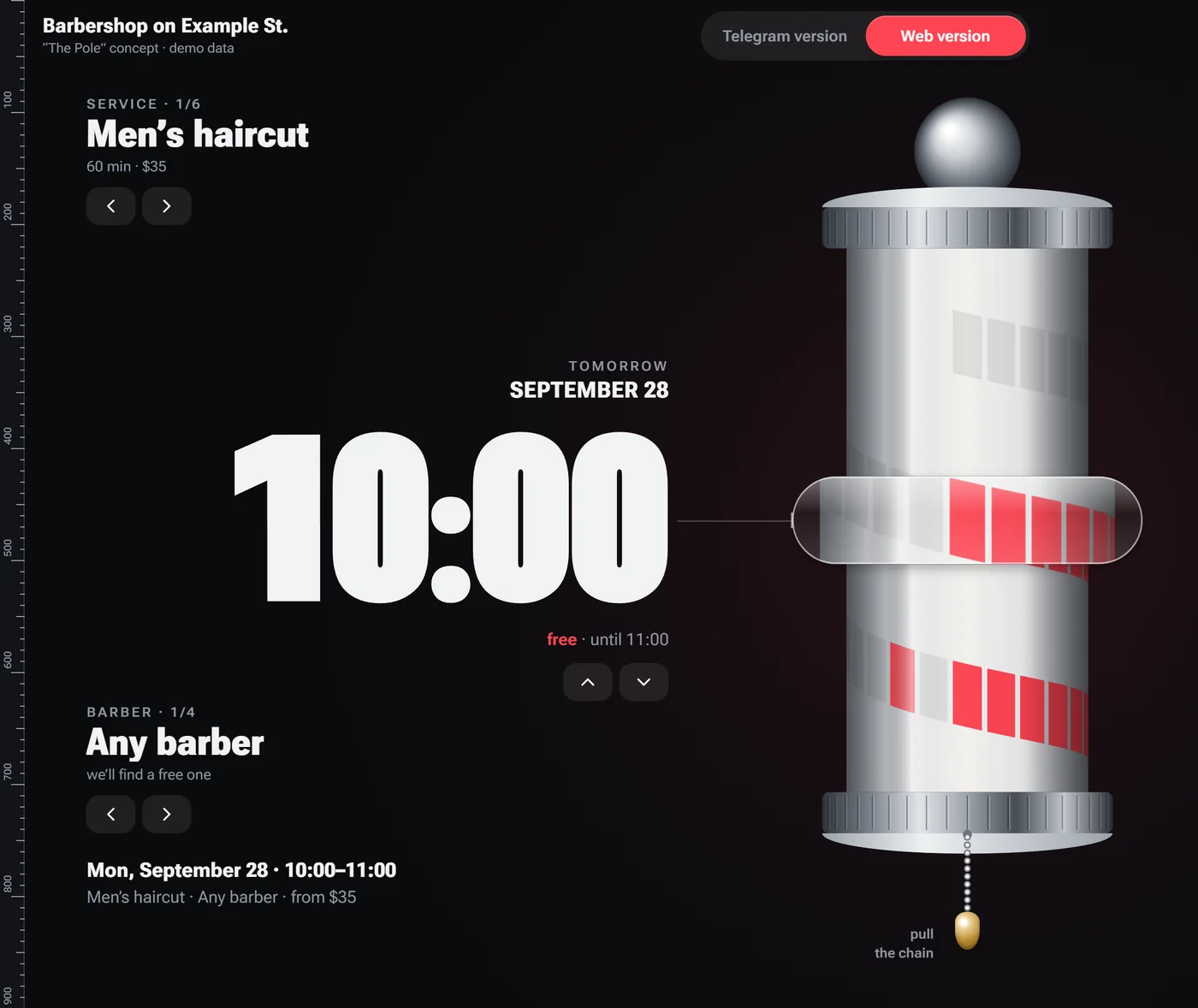
No screens or tabs: the whole schedule is wrapped around a 3D barber pole. Spin the helix, pick a service and a barber with the caps, pull the chain — and you're booked.

Platformweb: phone and desktop
Renderingcanvas 2D, inertia and snapping to a free slot
TypeRoboto Flex: digit width follows spin speed
Accessibilityevery gesture has a button and keyboard twin
StackJavaScript, Canvas 2D, View Transitions
  1. Top cap picks the service.

  2. The lens magnifies the slot next to the time.

  3. The helix is the schedule: one turn is a working day, one segment is 30 minutes. Red means free.

  4. Bottom cap picks the barber.

  5. Pull the chain — the lamp lights up and the ticket flies to “Mine”.

  6. The digits stretch while the pole spins.

  7. All of it also works with buttons and the keyboard.

Desktop version of “The Pole”: 10:00 and the pole with the schedule
Sheet 02.2. The same booking on a phone: spin the pole with a finger.

02.3 Takeaway ordering and a barista screen

“Bean” coffee shop

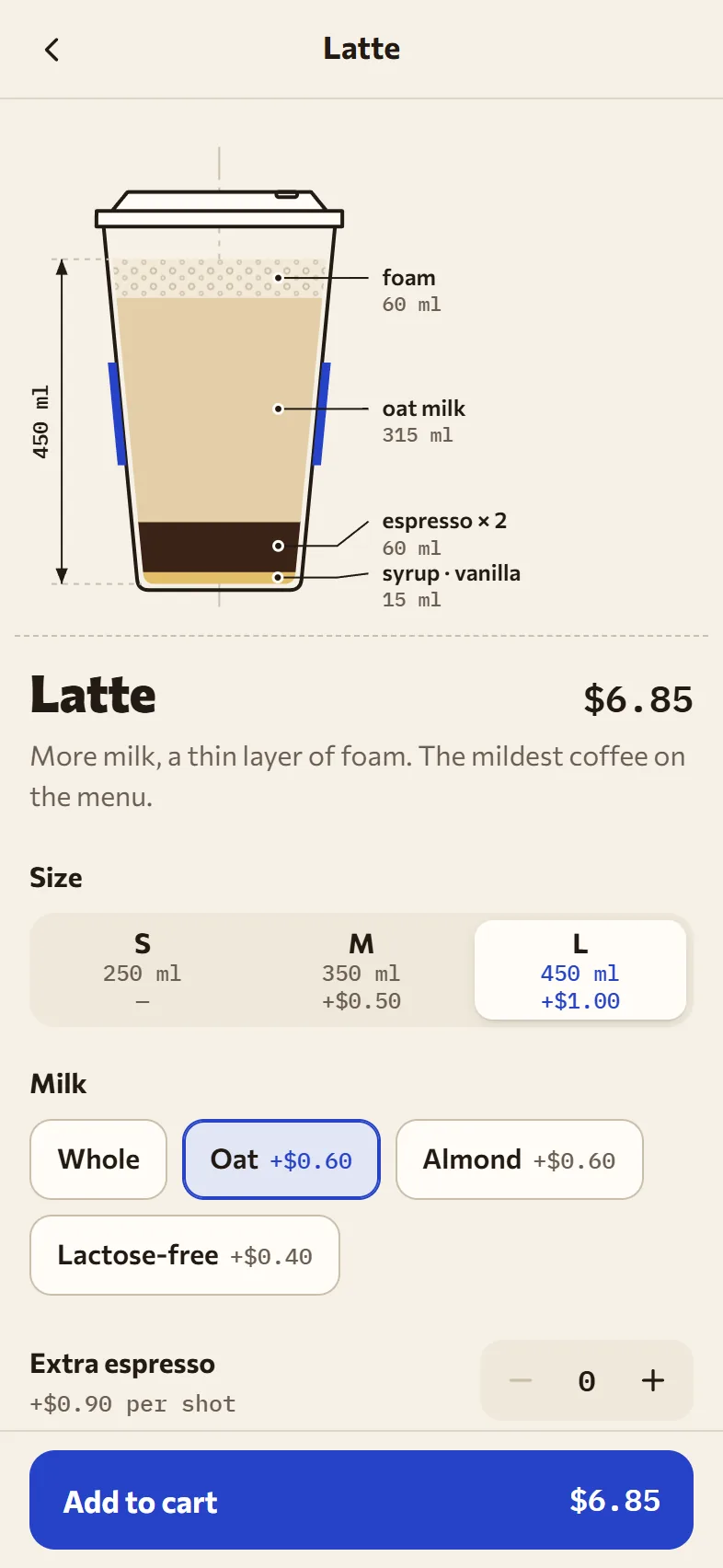
Two sides of one system. In Telegram the guest builds a drink — the cup cross-section redraws as they go — picks a pickup time and pays at the counter. The order prints on the barista’s tablet at once, and “Ready” comes back to the guest as a notification.

Platformguest Telegram Mini App and a web barista screen for a tablet
Syncthe order lands on the tablet instantly, “Ready” goes back to the guest; no server in the demo
Buildera cup cross-section drawn from the recipe: layers in millilitres, size changes the cup
TelegramMainButton, BackButton, haptics, theme and header colour
LanguagesEnglish, Ukrainian, Slovak, Russian — with $, ₴, € prices
StackHTML, CSS, JS, no frameworks · SVG · Telegram Mini Apps API
Open the demo (opens in a new tab) coffee.anorrodev.tech
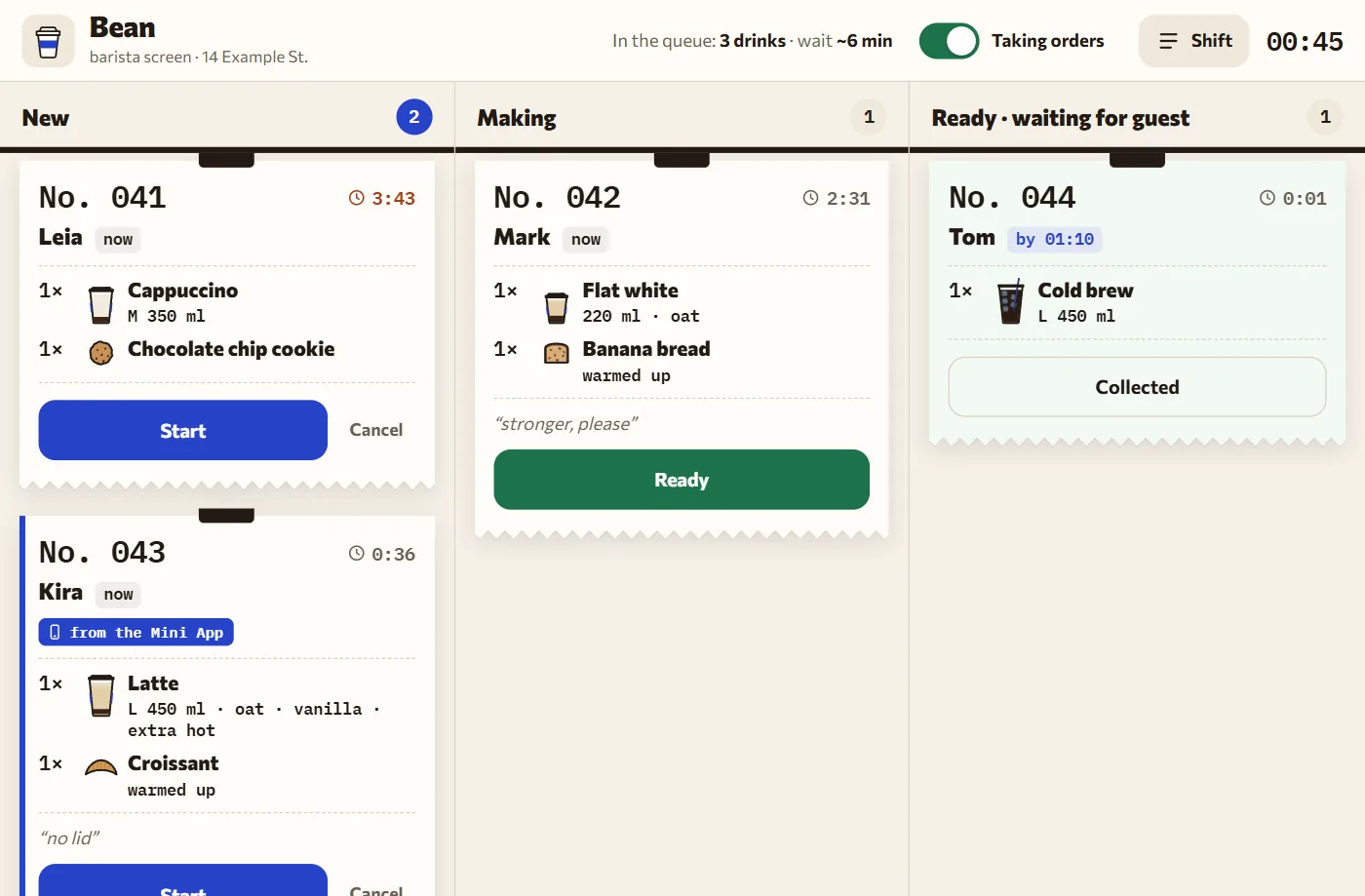
  1. A new order “prints” onto the rail, like a kitchen ticket.

  2. The blue stripe and tag: this order came from the guest’s Mini App.

  3. The timer turns red when an order waits longer than three minutes.

  4. Tap “Ready” and the guest gets a notification right away.

  5. Shift panel: pause orders and the stop list — sold-out items disappear for the guest instantly.

Barista screen: tickets in the New, Making and Ready columns
Guest Mini App: a latte in cross-section — foam, oat milk, espresso and syrup in millilitres
Sheet 02.3. Guest Mini App: size, milk and syrup rebuild the cup cross-section.
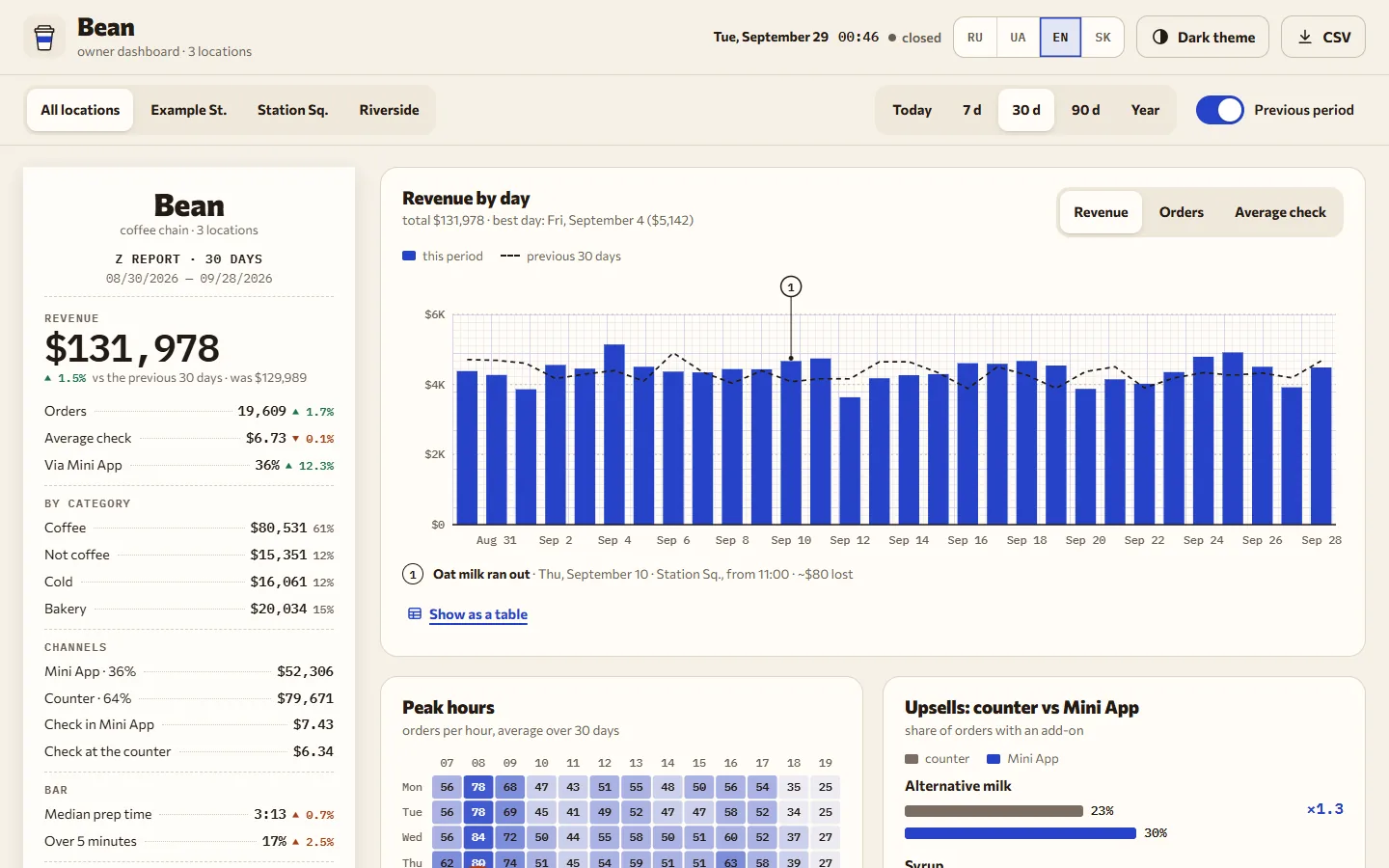
Owner dashboard on a laptop screen: Z report on a till roll, revenue by day and peak hours
Sheet 02.3/2. A 1440 × 900 screen, like a 14-inch laptop. On a phone the dashboard folds into one column.
  1. A till roll with the Z report for the period; ups and downs are marked with a sign, not only colour.

  2. Dashed line — previous period; circles — events like “oat milk ran out”, with the estimated loss.

  3. Location and period live in the URL, so a report can be shared as a link.

  4. Upsells at the counter and in the Mini App side by side — you can see what the drink builder earns.

02.3/2 Extra sheet · the owner’s side

Owner dashboard

The same coffee shop through the owner’s eyes: revenue of three locations, peak hours, Mini App upsells and bar speed. The data is fictional but live — an order from the demo Mini App lands in “Today” and in the Z report right away.

Platformweb dashboard for a laptop and a phone, also opens in Telegram
Chartshand-made SVG, no libraries: bars, heat map, histogram
Datatwo years of hourly sales for three locations, CSV export
Open the dashboard (opens in a new tab) coffee.anorrodev.tech/owner

02.4 Tire shop landing page · three versions

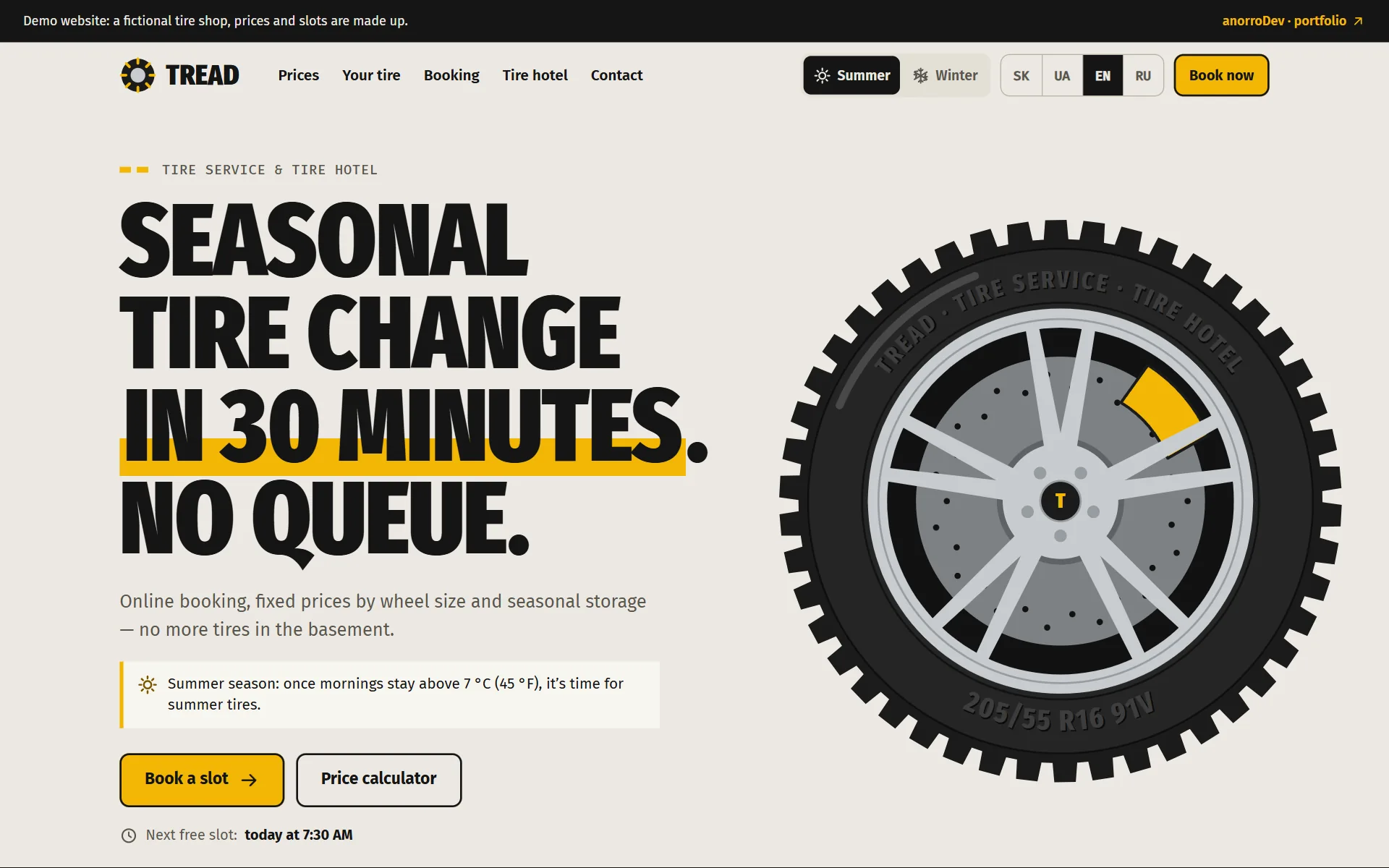
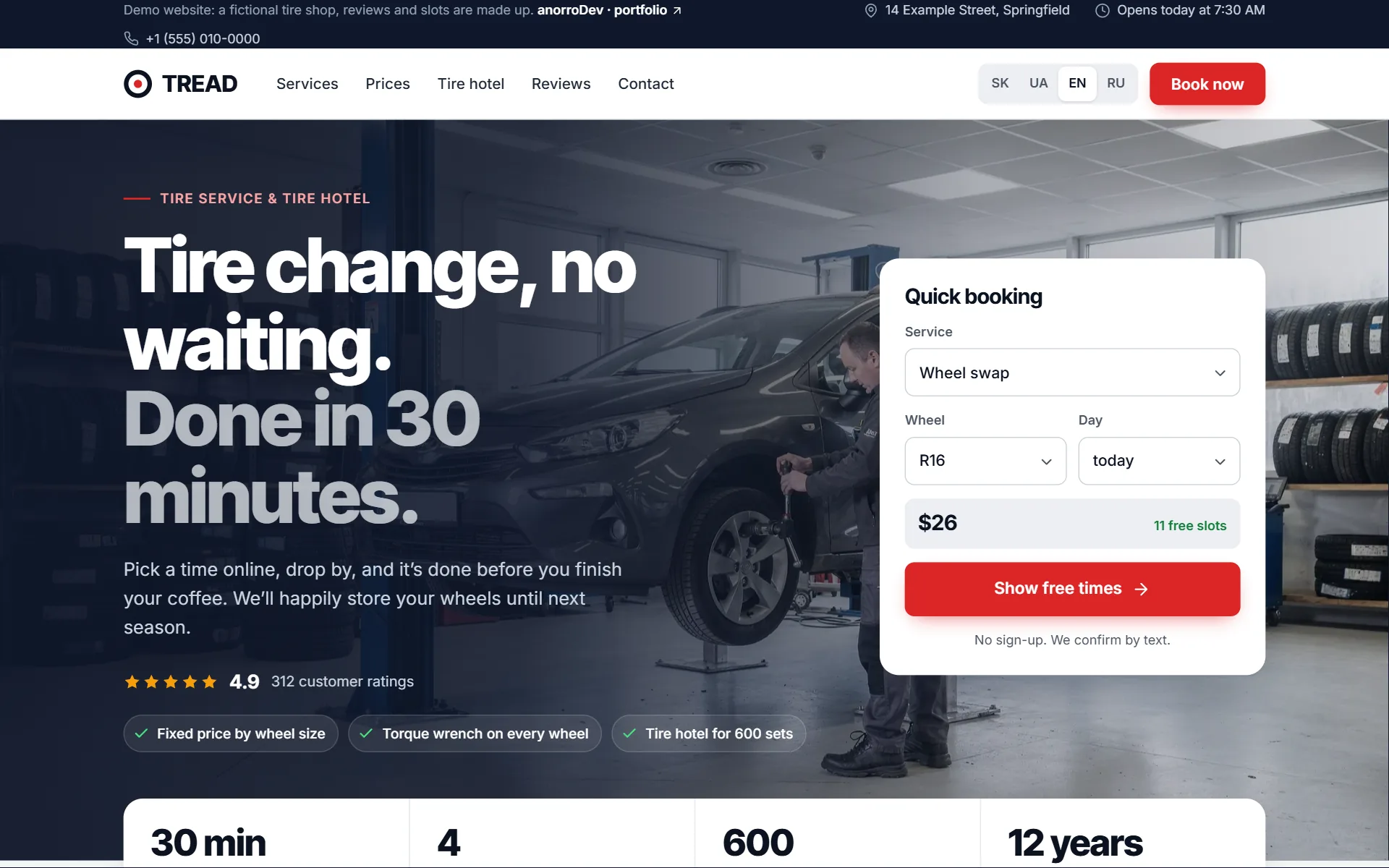
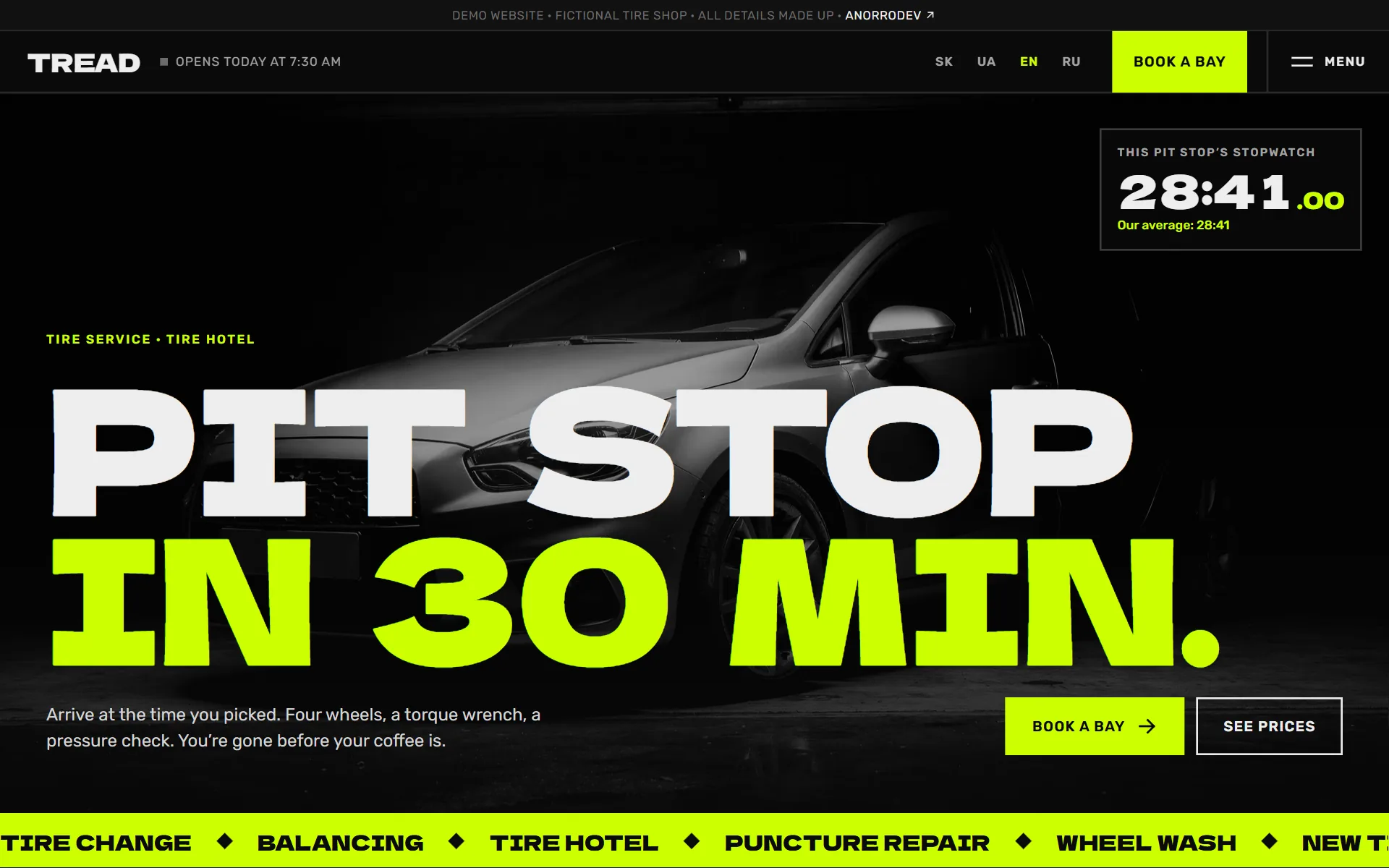
“Tread” tire service

One brief, three different websites. A tire shop needs customers to see the price at once and book without calling. I built it in three versions with different characters, so the client picks a mood, not a button colour.

Try all three dezen.anorrodev.tech
Platformlanding page: phone and desktop
Versionsthree designs on the same content: “Road”, “Premium”, “Pit stop”
LanguagesSlovak, Ukrainian, English, Russian — each with its own currency (€, ₴, $), address and plate format
Insidebooking a free slot, prices by wheel size, countdown to the season, tire hotel
Photosgenerated by an image model for each design, no stock photos
StackHTML, CSS, JS, no frameworks · SVG · Python build
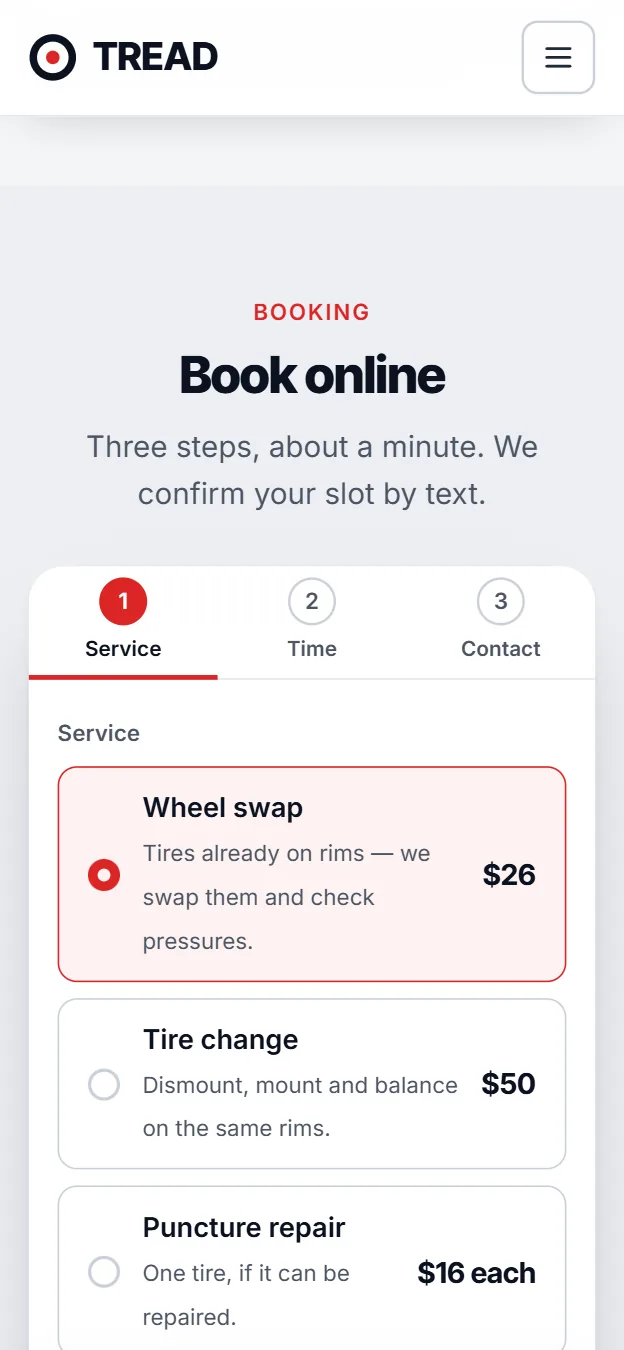
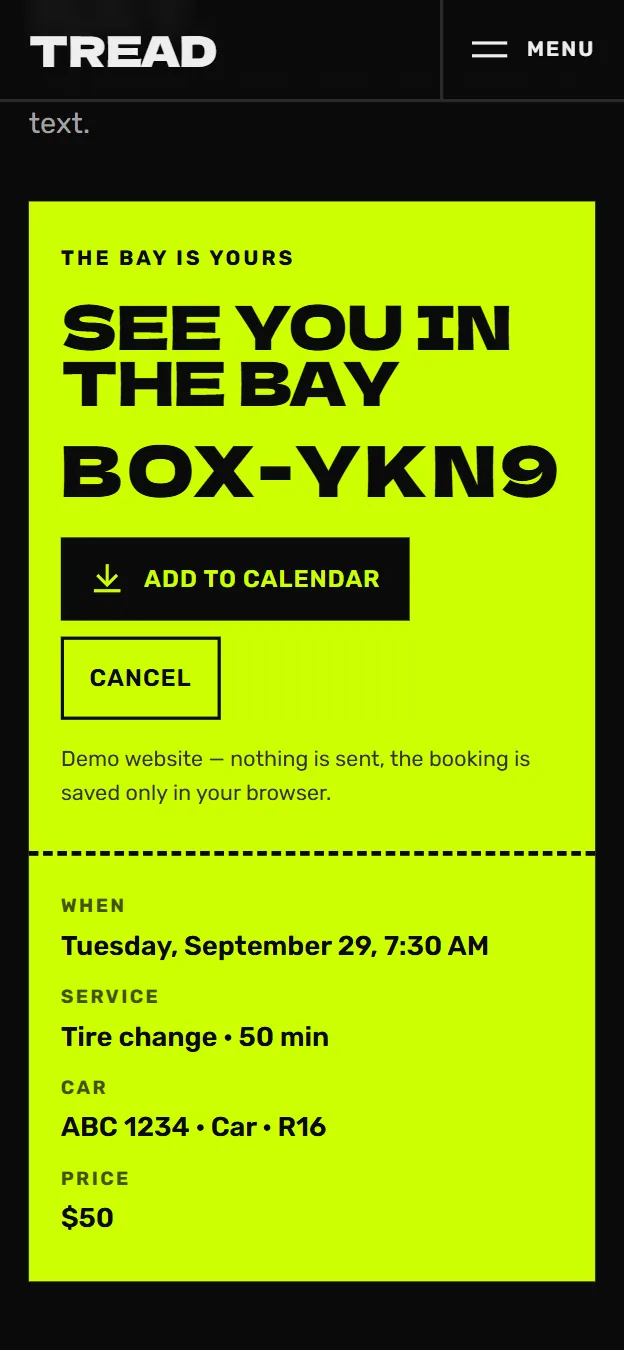
Sheet 02.4. One first screen, three versions. Click any of them to try it live; on a computer, each one opens up under the cursor.
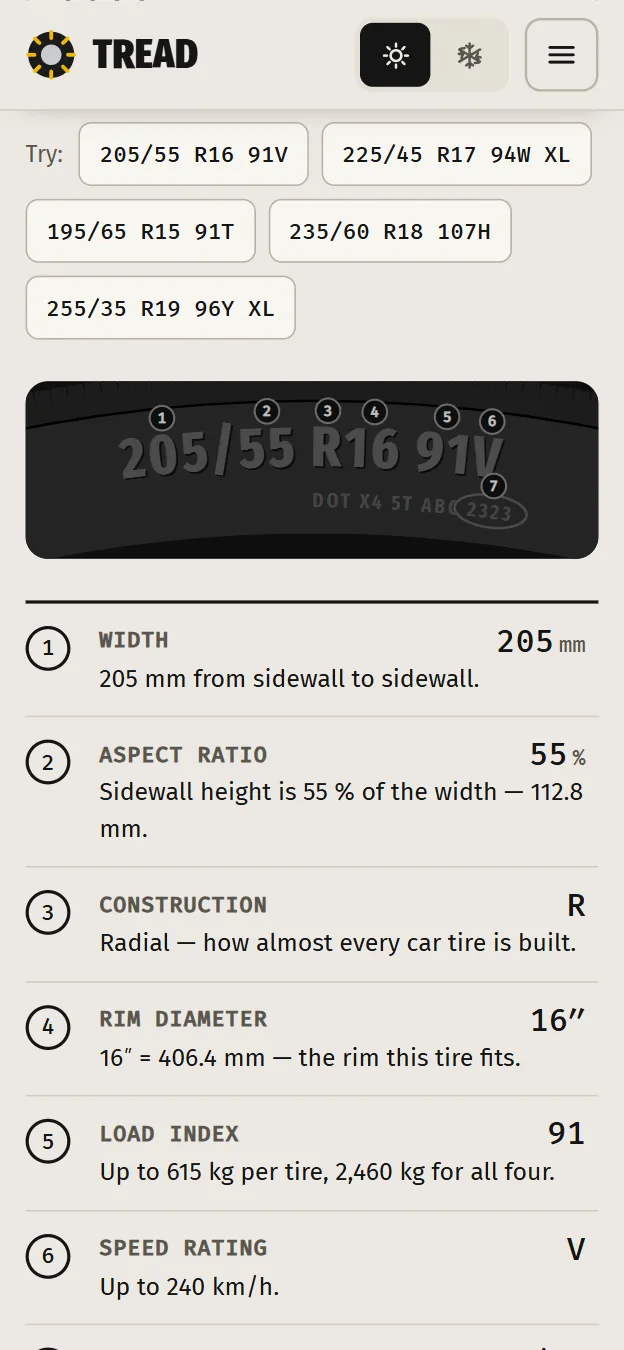
  1. Phone: the tire code 205/55 R16 91V decoded with callouts on the sidewall

    Version 1

    “Road”

    Road markings and tread. Sun-bleached concrete in summer, night asphalt in winter — the season switches the theme. The code from a tire sidewall is decoded right on a drawing.

    Colours
    #F2B705 #ECE9E2 #151515 #8FD0F7
    Fonts
    Fira Sans Extra Condensed · Fira Mono
  2. Phone: booking wizard, step 1 — choosing a service with its price

    Version 2

    “Premium”

    Photos, a rating and quick booking right in the first screen. Calm slate and a red button — for people who choose a service by trust. Booking is a three-step wizard.

    Colours
    #0F172A #DC2626 #F4F5F7 #FFFFFF
    Fonts
    Inter Tight · Inter
  3. Phone: a lime booking pass with the bay code

    Version 3

    “Pit stop”

    Black, lime and huge type. A stopwatch in the first screen, a ticker, one-screen booking — ending with a lime pass and a code.

    Colours
    #0A0A0A #CCFF00 #EDEDED #6B6B6B
    Fonts
    Dela Gothic One · Rubik

02.5 Bakery landing page · two versions

“Layer” cakes

Home bakers get messages asking for a price and customers wait for hours. Here the cake is visible at once: build it, see it cut open, get the price and book a free day with a deposit. Two versions — for a wedding-cake bakery and for next-day bento cakes.

Try both vrstva.anorrodev.tech
Platformlanding page: phone and desktop
Versions“Showcase” and “Bento” on the same content
LanguagesSlovak, Ukrainian, English, Russian — each with its own currency (€, ₴, $) and address
Insidecake builder with a cross-section, message piped on the bento, the baker’s schedule, 50% deposit
PhotosAI-generated: nine cakes and five bentos, no stock photos
StackHTML, CSS, JS without frameworks · SVG · Python build
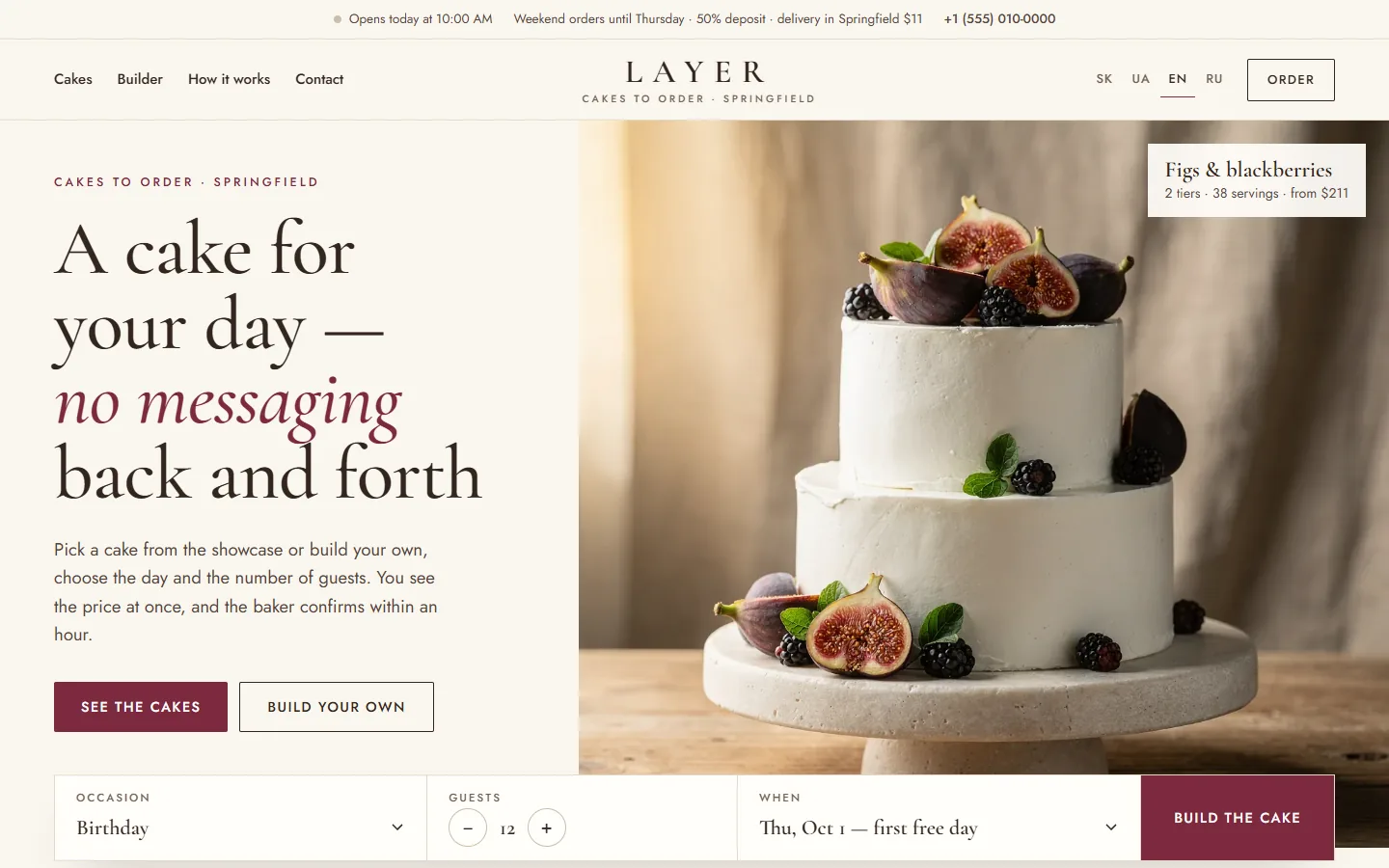
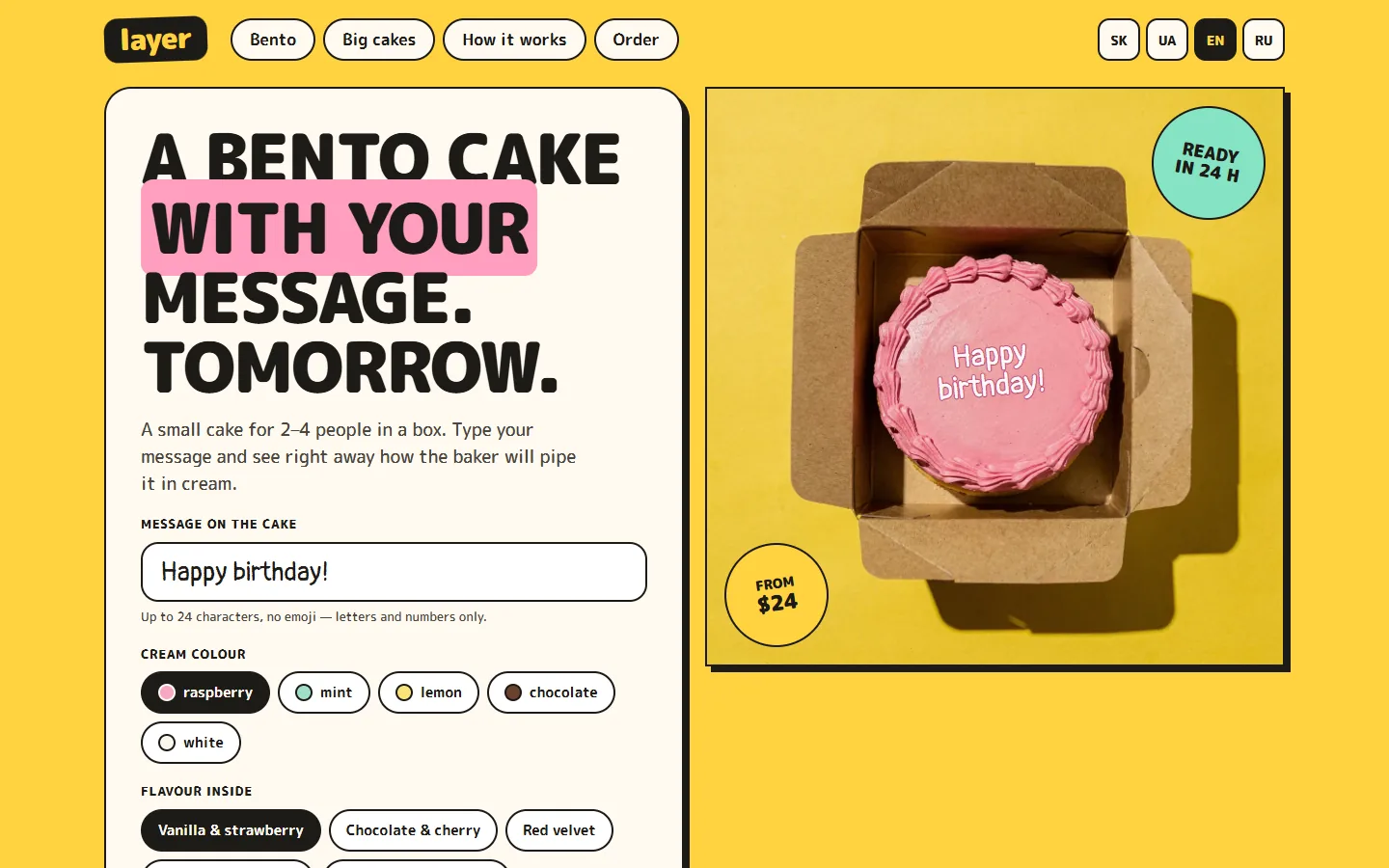
Sheet 02.5. One first screen, two versions. Click either to try it live; on a computer the version under the cursor opens up.
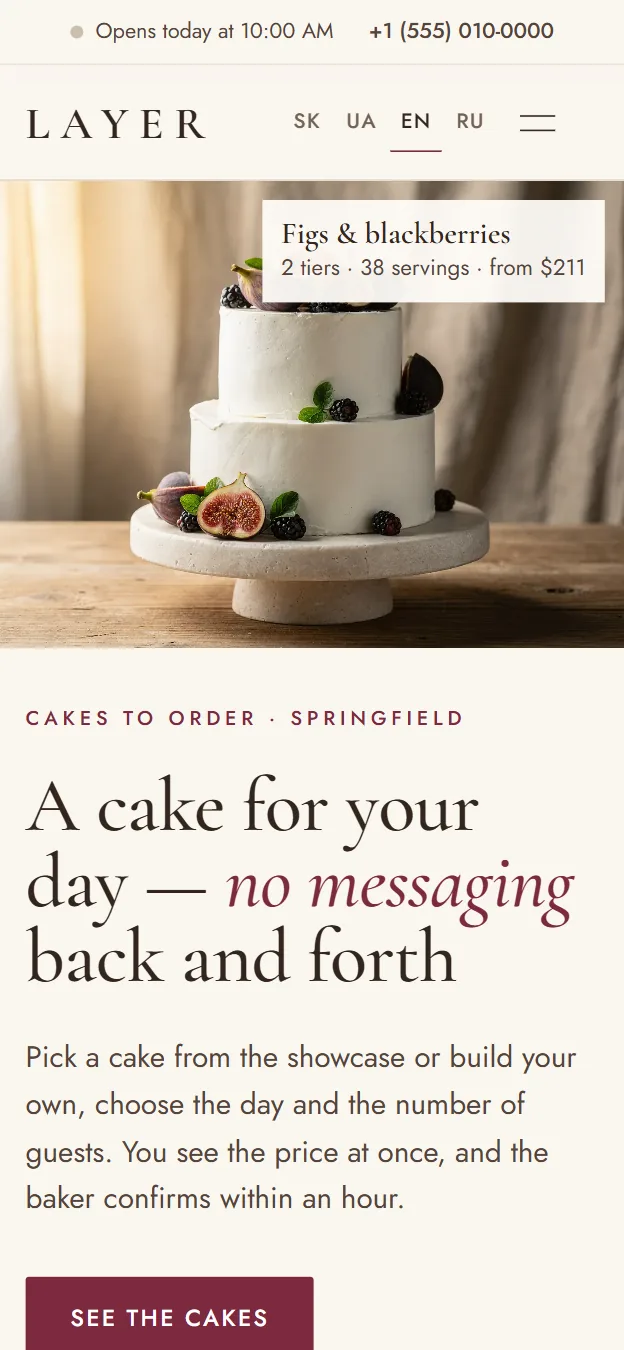
  1. Phone: the first screen of “Showcase” — a two-tier cake with figs and the headline

    Version 1

    “Showcase”

    A premium bakery told in photos. Occasion, guests and date right on the first screen; the builder shows the cake half outside, half cut open, layer by layer.

    Colours
    #FAF6EF #33261F #7D2A3F #E8DFD1
    Fonts
    Cormorant Garamond · Jost
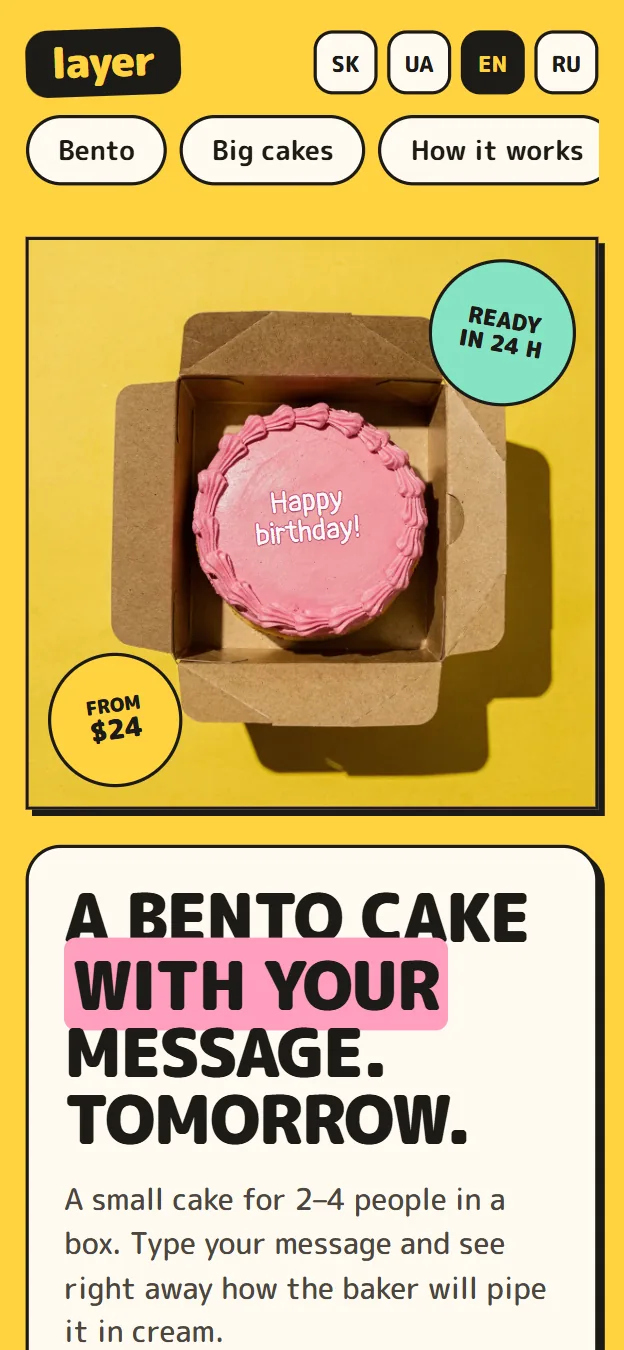
  2. Phone: a boxed bento cake with “Happy birthday!” piped in cream

    Version 2

    “Bento”

    Yellow, pink, thick outlines and stickers. Type a message and it is piped on the cake at once; the cream colour switches the photo; order by 6 pm for tomorrow.

    Colours
    #FFD23F #FF9EC0 #86E3C3 #1C1A17
    Fonts
    M PLUS Rounded 1c · Pangolin

02.6 Blank sheet

Didn’t find yours here?

Even better — your project will be the first of its kind. There are no templates here: every sheet is drawn from scratch for the task. Write its name in the title block and send it to me.

Clientyou Sheet02.6 Drawn byanorroDev
Discuss a project (opens in a new tab)

Telegram opens with the message ready — just hit Send.

Sheet 03 About

About

I'm anorroDev — a designer who writes code. I take a project from the first sketch to launch: I work out how it looks and feels, build it and ship it.

I make websites, Telegram bots and Mini Apps for small businesses — like the works above: a barbershop, a coffee shop, a tire service, a cake shop. I make sure a customer can book or order without extra steps, and the owner can see what's going on. So along with the interface I build the invisible part too — the bot, the database, the server, the owner's dashboard. In several languages from the start, with prices in the right currency.

Legend

  • Solid line — what people see: the interface, motion, button labels.

  • Dashed line — what's under the hood: the bot, the database, the server, deployment.

  • Dash-dot line — the axis — a person's path from the first screen to a booking or a purchase.

  • Red line — corrections. I make them myself before anyone notices.

Bill of materials

ItemAreaContentsWhat for
1Designinterfaces, design systems, prototypeshow the product looks and feels
2Front-endHTML, CSS, JavaScript, TypeScriptwebsites and Mini Apps
3FrameworksReact, Next.js, Tailwindwhen the project grows
4MotionCSS, Canvas 2D, GSAP, View Transitionsanimation that explains
5TelegramBot API, Mini Appsbots and Mini Apps
6ServerPython, aiogram 3, aiohttp, SQLitebot logic and data
7ShippingGit, GitHub, Cloudflare Pages, Azurelaunch and updates

Technical requirements

  1. The interface must feel alive — and stay smooth on a phone.
  2. Animation explains what happened. If it doesn't, it isn't there.
  3. The demo opens from a link, no sign-up.
  4. What's drawn is what's built. No “we'll fix it later”.

Sheet 04 Route card

How the work goes

Five operations, like on a route card. After each one you have something to open from a link — nothing happens behind closed doors.

  1. Op. 005

    Brief

    We talk on Telegram about what’s needed, who it’s for and how it should work. If the idea is still rough, I’ll suggest where to start.

    Result
    a short spec: screens, features, price and timeline
    From you
    a few sentences about the task and sites you like
  2. Op. 010

    Sketch

    I draw the main screens exactly as I’ll build them — not a “picture for the pitch”.

    Result
    sketches at a link; changes happen before any code
    From you
    comments on the sketches
  3. Op. 015

    Build

    I build the interface and what’s under it: the bot, the database, the server. You see progress along the way, not just at the end.

    Result
    a live demo you can tap through on your phone
    From you
    texts, photos, prices
  4. Op. 020

    Launch

    I connect the domain, notifications and payments if you need them, and ship it.

    Result
    a working website, bot or Mini App and the access to it
    From you
    a domain or access to it
  5. Op. 025

    Support

    I’ll fix things if something goes wrong and extend the product when the business needs more.

    Result
    a product that grows with the business
    From you
    a message when you need something

Sheet 05 Contact

Shall we talk?

Write a couple of sentences about the project — I'll reply and suggest where to start.

Message me on Telegram (opens in a new tab)
Drawn byanorroDev
Telegram @anorroDev (opens in a new tab)
Email [email protected]
GitHubgithub.com/anorroDev (opens in a new tab)
Clientyou
Sheet05 Sheets05
Scale1:1 Date2026

Test bench “Tread” tire service

New tab

Test bench “Layer” cakes

New tab